

ArtsyLens — a tour guide that answers back
A working prototype that treats a museum or monument like a conversation instead of a map.
Context
The AI travel-planning category is loud right now — Wonderplan, Mindtrip, and a dozen others are all racing to generate the perfect day-by-day itinerary. That's a real problem, but it's also the easy half of a trip. The itinerary tells you where to stand. It doesn't tell you why the gate you just walked through was built to make the Taj Mahal look closer than it is, or what the pietra dura inlay above your head actually means. That gap — the moment you're physically standing in front of something and have no one to ask — is where a printed guidebook and a generic AI itinerary both go quiet. ArtsyLens is built for that exact moment, not the planning stage before it.
The product decision that mattered
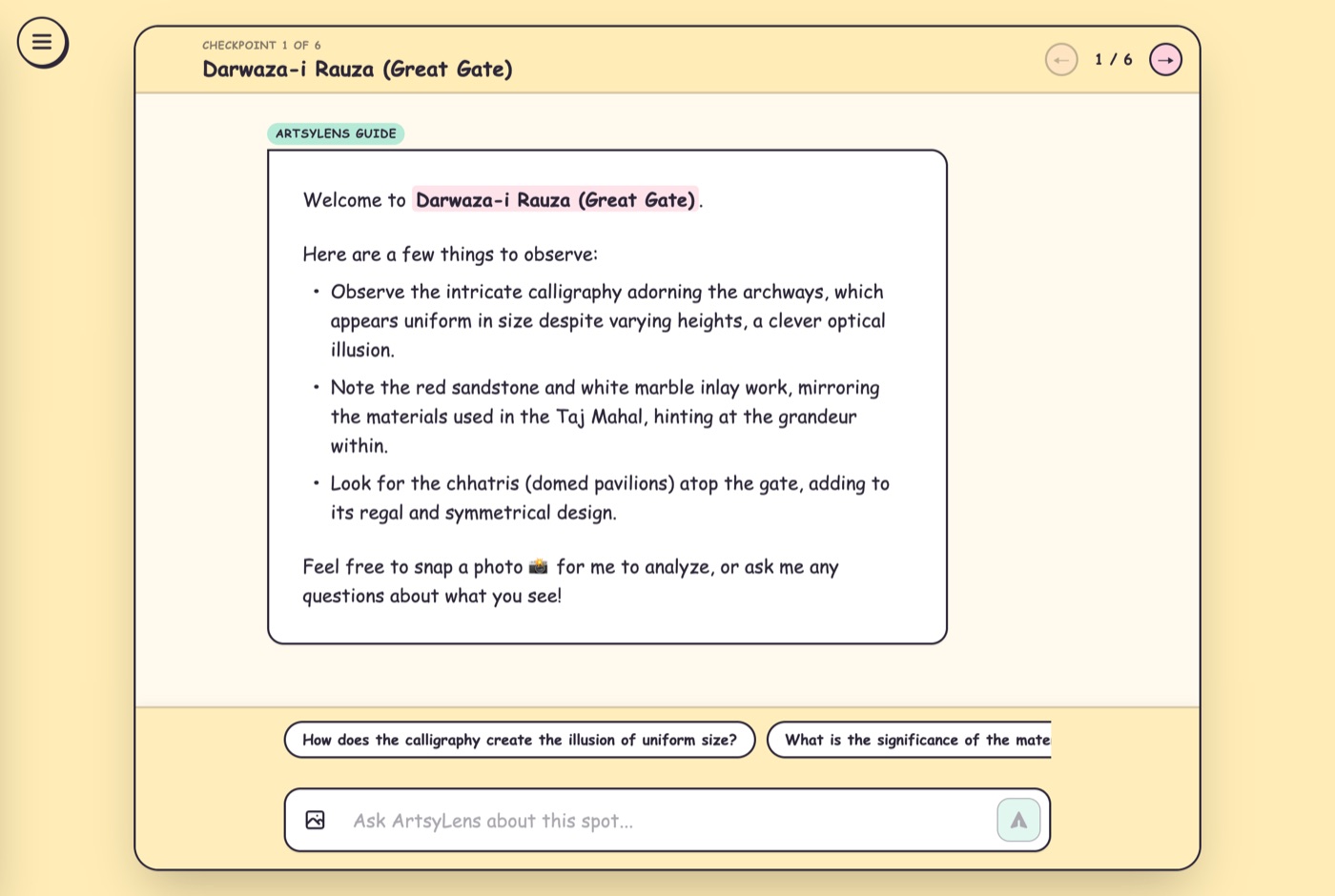
The default build here is obvious: generate a 5-stop itinerary, show it as a list, done — that's what every AI trip planner already ships. I rejected stopping there because a list of stop names is just a fancier map pin. The decision was to make each checkpoint its own conversation: when you open a stop, ArtsyLens doesn't recite a paragraph and move on — it hands you a chat, seeded with specific "things to spot" for that exact spot, three suggested questions to get you started, and an open box to ask anything else. You can even snap a photo of what's in front of you for it to analyze. That's a materially harder product to build than a static description, and a less impressive-looking landing page, but it's the only version that's actually useful once you're standing there rather than reading about it on a couch.
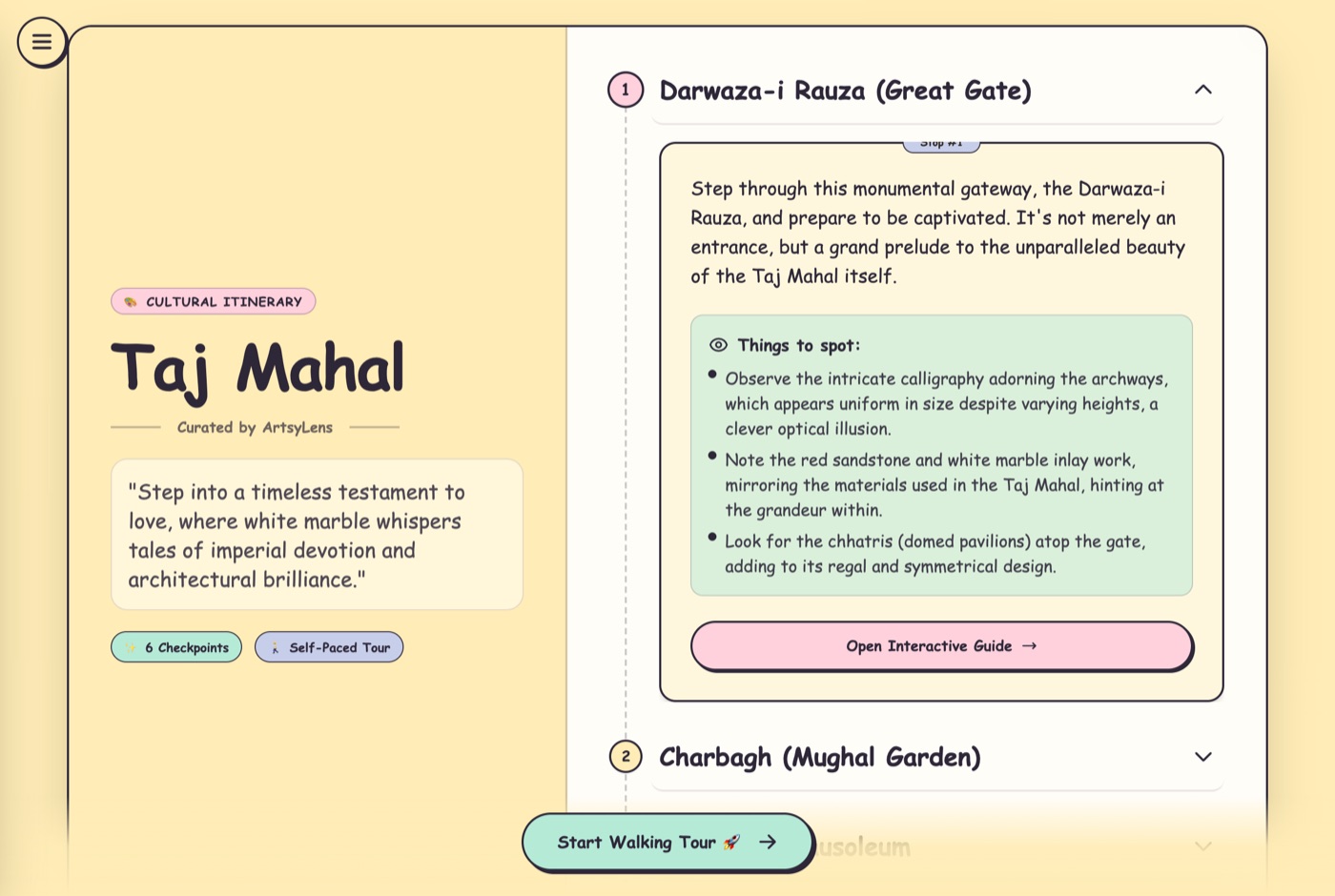
The second decision was pacing the generation. I could have generated the full 5-stop itinerary and every checkpoint's content in one shot before showing anything — simpler to build, and it's what most AI itinerary tools do. I built it to stream instead: the itinerary list appears immediately with the first couple of stops fully written, and the rest fill in progressively ("Preparing Guide...") while you're already reading stop one. For a product whose whole pitch is "don't make the user wait around planning, get them exploring," making them stare at a loading spinner before they see anything would have undercut the premise on the very first screen.
The third was tone. Every competitor in this space reads like a corporate travel-booking site — blue gradients, stock airplane icons. I deliberately built ArtsyLens around a hand-illustrated, Van-Gogh-textured aesthetic with playful copy ("Curated by ArtsyLens," checkpoint cards that feel like a travel journal). That's a positioning bet, not a decoration choice: the target user isn't a business traveler optimizing a layover, it's someone who wants a museum or a monument to feel like discovery again, and the UI has to signal that before a single word of copy loads.
What it does today
A user picks a destination — a museum, a city, a monument — and gets a self-paced itinerary of checkpoints, each with a short orienting description, specific "things to spot" grounded in that location's actual history and architecture, and a live guide chat with suggested questions and photo analysis. Past journeys are saved so a user can pick up a half-finished trip. It works for both a single landmark (the Taj Mahal) and a sprawling one (the Louvre), which forced the itinerary logic to scale from 5 stops to dozens without the experience changing shape.
What I'd need to prove next
The honest gap: this is a content-generation and conversation prototype, not a location-aware one yet — it doesn't know where you're physically standing, so it can't yet nudge you from stop to stop or confirm you're actually looking at the right pietra dura panel. That's the next real product question, and it's a genuinely hard one (indoor positioning, computer-vision confirmation against a reference image, offline reliability in a museum basement with no signal) rather than a checkbox feature — the kind of constraint that would shape a real roadmap rather than a demo.
What this shows about how I work
I didn't chase the crowded, easy-to-demo part of this category (itinerary generation). I looked for the moment existing tools abandon the user — standing in front of the thing itself — and built for that, even though it meant a harder architecture (per-checkpoint chat, progressive generation, multimodal photo input) than a single generated PDF would have needed. That's the trade I'd make on a real product too: build for the moment of actual use, not the moment that's easiest to screenshot.
Try it
Built solo with Claude Code. View the live prototype →